1. Inspiration source
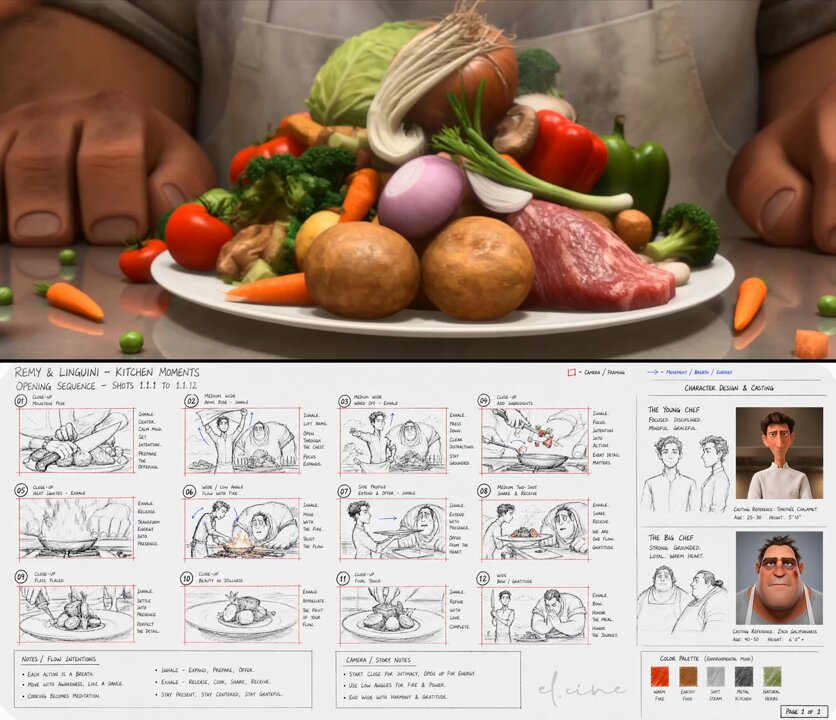
Community example
This tutorial teaches a similar generation technique using VidLuma. Credit public inspiration, replace brand-specific details, and avoid presenting someone else's work as your own original output.
2. Effect breakdown
Output target
Video · 4:5
Use case
Characters
Main tool
Image to Video
Model family
GPT Image 2, Seedance 2.0
3. Prompt recipe
Treat this as a recipe, not a locked script: replace the subject, brand, scene, and ratio while keeping the motion/layout constraints.
A hand-drawn animation storyboard page on cream/off-white paper, titled "REMY & LINGUINI — KITCHEN MOMENTS: OPENING SEQUENCE — SHOTS 1.1.1 TO 1.1.12" in handwritten capital letters at the top left. Layout: Professional pre-production document with 12 numbered storyboard panels in a 4×3 grid on the right two-thirds of the page. Style: Mixed media — loose graphite/pencil sketches with red ink frame borders, blue arrow annotations, handwritten capital-letter notes, and two photorealistic 3D character renders inset on the right. Authentic film pre-production document feel, clean white background, slight paper texture.
4. Recommended settings
ToolImage to Video
Aspect ratio4:5 (portrait)
First runGenerate one draft first; create variants only after composition is stable.
Reference ruleUse a clean image reference when possible; avoid overloading camera movement.
5. Step-by-step
1
Step 1 · GPT Image 2 (storyboard)
A cream-paper, mixed-media animation storyboard with 12 numbered panels in a 4×3 grid.
View step prompt
A hand-drawn animation storyboard page on cream/off-white paper, titled "REMY & LINGUINI — KITCHEN MOMENTS: OPENING SEQUENCE — SHOTS 1.1.1 TO 1.1.12" in handwritten capital letters at the top left. Layout: Professional pre-production document with 12 numbered storyboard panels in a 4×3 grid on the right two-thirds of the page. Style: Mixed media — loose graphite/pencil sketches with red ink frame borders, blue arrow annotations, handwritten capital-letter notes, and two photorealistic 3D character renders inset on the right. Authentic film pre-production document feel, clean white background, slight paper texture.
6. Common mistakes
Too broad
“Make it cinematic and cool” gives the model no crop, material, or motion constraints.
Better
Name the subject, ratio, lighting, layout, motion, and what must remain unchanged.